
The August 2026 release of Symmetry GUEST/CONNECT delivers expanded identity field alignment between Identities and Symmetry Cardholders, plus six customer-requested enhancements spanning credential management, visitor workflows, and access control configuration. This release also addresses 14 reported issues across identity management, credentials, and visitor management.
| 1
New Feature |
14+
Bug Fixes |
6
Enhancements |
Important Information
Identity Classic View Removal — September Release
The Identity Classic View will be permanently removed in the September release. Any user still on the Classic View at that time will be automatically switched to the new Identity page.
We encourage all users to transition to the new Identity page now to familiarize themselves with the updated layout ahead of the September release.
New Features & Enhancements
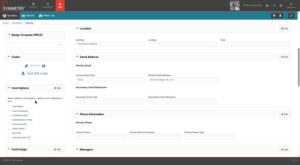
- Expanded Identity & Symmetry Field Alignment
Identities now support a broader set of Symmetry cardholder fields, keeping identity data consistent between the two systems without manual re-entry. Additional credential-level options and cardholder attributes — previously only editable directly in Symmetry — are now available within Identities.
- New cardholder fields: DeactivationLevel, VisitorEscort, and seven per-credential card options (including extended access, passage mode, and PIN configuration) are now synced and editable in the identities page.
- Field-level audit logging: Every change to identity fields is individually recorded in the audit trail, making it straightforward to track who changed what and when.
- Automatic resync: A new resync pipeline ensures existing identities are automatically updated with the newly supported fields — no manual migration required after upgrade.
- One source of truth: Administrators no longer need to switch between CONNECT and Symmetry to manage these fields, reducing the risk of data mismatches.
Where to find it Navigation: IDM > Identity Profile > Credentials / Settings — new fields appear automatically after upgrade
2. Credential Management via Public API
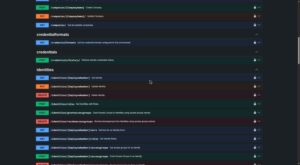
The Public API now supports full credential lifecycle management. Integrations and automated provisioning workflows can create, update, and delete credentials programmatically — no manual intervention required.
- Create, Update, Delete: POST, PUT, and DELETE endpoints for credentials are now available in the Public API, wrapping the same internal logic used by the UI.
- Per-Card-Type Validation: POST and PUT requests are validated against the rules for each card type, returning informative error responses for invalid input rather than generic server errors.
- Discover Valid Formats: A new GET /credentialformats endpoint lets API consumers retrieve the list of configured credential format names dynamically, so integrations do not need to hardcode values.
- Duplicate Detection: Attempts to create a credential that already exists return a Conflict response, making provisioning workflows safe to retry.
- Credential Status in Responses: GET credential responses now include a Status field — Active, Lost, or Inactive — giving consumers full visibility into the current state of each credential.
Where to find it Public API: GET /credentialformats | POST /credentials | PUT /credentials/{id} | DELETE /credentials/{id}
3. Additional Details Field for Credential Requests
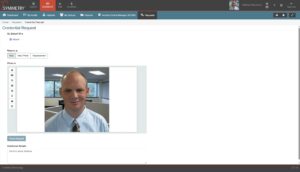
Access requests now include a free-text Additional Details field, giving requestors a place to provide context that approvers need — reducing back-and-forth before a request is actioned.
- Free-text input on requests: Requestors can enter supplementary information — a business reason, cost center, manager name, or any other relevant context — directly on the request form.
- Visible to approvers: The additional details appear alongside existing fields in the approver’s request view, so no context is lost during the approval workflow.
- Searchable: The field is indexed, making it possible to locate specific requests by their additional details content.
Where to find it Navigation: IDM > Requests > Create Request — Additional Details field
4. IDS Code Clearing
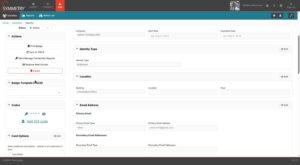
Administrators can now clear an IDS code from a credential in the Identities page. All PIN and IDS code changes are also now recorded in the Symmetry Integration report, providing a full audit trail for these credential values.
- Clear IDS Code: A new Clear action on the credential panel lets administrators remove an IDS code without deleting the credential itself.
- PIN & IDS Code Changes in Reports: Every modification to a PIN or IDS code — including clears — is now captured as an event in the Symmetry Support integration report, making these changes fully auditable.
- Note on PIN clearing: Because Symmetry requires a PIN value on every credential, clearing a PIN is not supported in this release. The PIN Clear button will be enabled when Symmetry adds support for PIN removal in a future update.
Where to find it Navigation: IDM > Identity Profile > Credentials — IDS Code field — Clear button
5. Full Access Control Rule Visibility in Widget
The IDM dashboard widget now displays all Delete Access Control Rules (ACRs) and ACRMs, giving operators a complete and accurate picture of the access control rules currently in effect for an identity.
- Complete rule display: Previously, some Delete ACR and ACRM entries were omitted from the widget view. All entries now appear regardless of type or total count.
- No configuration required: The change applies automatically on upgrade. No settings need to be adjusted.
Where to find it Navigation: IDM Dashboard > Identity Widget > Access Control Rules
6. Facility Code Whitelist
Administrators can now define a whitelist of allowable facility codes for credential assignment. Credentials using codes outside the whitelist can be identified and acted upon, reducing the risk of misconfiguration across large card deployments.
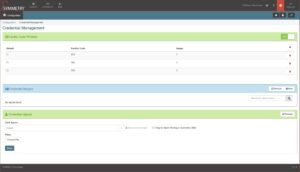
- Configure permitted codes: A new Facility Code Whitelist setting lets administrators specify exactly which facility codes are valid for credential issuance at their site.
- Impact preview before applying: A usage modal shows which credentials and identities would be affected by a whitelist change, so administrators can review scope before committing.
- Revoke or delete out-of-range credentials: When credentials using non-permitted facility codes are identified, administrators can revoke access or delete the credential directly from the whitelist management screen.
- Role visibility: Photo Techs, Managers, and other roles with appropriate permissions can view the whitelist configuration — not just system administrators.
Where to find it Navigation: IDM > Global Configuration > Facility Code Whitelist
7. Recurring Visits
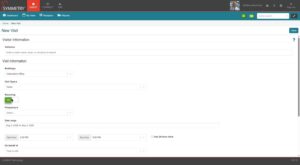
Symmetry GUEST now supports recurring visit scheduling. Hosts can create a visit series with a repeating pattern and manage the full series lifecycle — editing or cancelling individual occurrences or all future visits in one action.
- Create recurring series: When scheduling a visit, hosts can enable the Recurring toggle and choose a repeat pattern. The system generates the full series in a single action.
- Edit this or all future visits: Changes can be applied to the current occurrence only or to all future occurrences in the series, making it easy to update times, hosts, or visitor details without recreating the schedule.
- Cancel series forward: Hosts can cancel a single occurrence or cancel from that point forward. The series record is preserved for reference after cancellation.
- Shared visitor credentials: A visitor’s PIN and access credentials are set once and shared consistently across all occurrences in the series.
- Host reminders: Reminder notifications are sent ahead of each occurrence, keeping hosts informed automatically across the life of the series.
Where to find it Navigation: Symmetry GUEST > Visits > Create Visit — enable the Recurring toggle at schedule time
Bug Fixes & Reliability
| Area | What Was Fixed |
| Security | Security Managers assigned to a specific building were able to view and edit Watch List entries belonging to other buildings. Security Managers now only see and manage Watch List entries for the buildings they are explicitly assigned to. |
| Symmetry GUEST | It was not previously possible to schedule a visit that repeats on a regular basis — each occurrence had to be created individually. Hosts can now set up a recurring visit series in a single step and manage or cancel the entire series from one screen. |
| Symmetry IDM | There was no way for administrators to restrict which facility codes could be used when issuing access cards. Administrators can now define an approved list of facility codes, and any credential using a code outside that list can be identified and revoked directly from the management screen. |
| Symmetry IDM | The search box used to filter Access Groups on an identity’s profile was displaying narrower than intended. The filter box now stretches to use the full available space. |
| Symmetry IDM | Users with the Tenant Manager role were unable to complete bulk identity uploads — the process would fail without a clear explanation. Tenant Managers can now upload identity files successfully. |
| Symmetry IDM | Administrators who configured a custom font for badge or Wallet settings pages were not seeing their changes reflected. Custom font settings are now applied correctly throughout those configuration pages. |
| Symmetry IDM | Dates and times shown on the Credentials tab — such as when a credential becomes active or expires — were always displayed in English regardless of the user’s language preference. These values are now shown in the user’s chosen language. |
| Symmetry IDM | Key dates on the Access tab — including when access was granted, when it starts, and when it ends — were not being translated to the user’s selected language. These dates now display correctly in the user’s chosen language. |
| Symmetry IDM | When printing a badge for a person with no photo on file, a broken image icon was appearing in the photo selection area. The badge printing screen now handles this scenario correctly. |
| Symmetry IDM | When a field such as Citizenship was configured as read-only, trying to save other changes on the same identity record would fail entirely — even when the read-only field itself had not been touched. Read-only field settings no longer prevent other identity information from being saved. |
| Symmetry IDM | When an identity is suspended, their physical access card should be deactivated at the same time. In environments using Optional Access Control Rules mode, this was not happening. The card is now correctly deactivated in all modes when an identity is suspended. |
| Symmetry IDM | Manager Delegates — users authorized to manage identities on behalf of another manager — were blocked from updating expiration dates. Manager Delegates can now change expiration dates as intended. |
| Symmetry CONNECT | When a card was marked as lost or forcibly deactivated in Symmetry, that status was not always being reflected in CONNECT — the credential could still appear active. This synchronization issue has been resolved: credential status changes in Symmetry are now consistently reflected in CONNECT. |
Full release notes are available on the Portal.
For support, contact your AMAG representative or open a ticket at support.amagsymmetry.com.